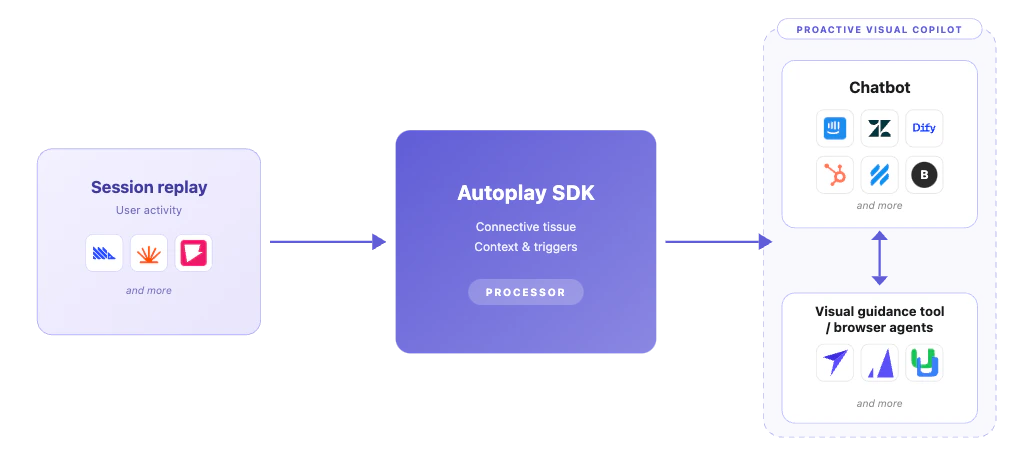
Step 1 — Create your Autoplay account

Go to app.autoplay.ai and sign up. Once inside the dashboard you will find your Product ID and API key — you’ll need both in the next step.

Step 2 — Add the Autoplay snippet in your frontend

Add the snippet below to your frontend and replace the placeholders with the API key and Product ID from your Autoplay dashboard.
import posthog from 'posthog-js'

posthog.init('YOUR_AUTOPLAY_API_KEY', {
    api_host: 'https://us.i.posthog.com',
    person_profiles: 'identified_only',
    session_idle_timeout_seconds: 120, // stop capturing after 2 min of inactivity
    loaded: (posthog) => {
        posthog.identify(posthog.get_distinct_id(), {
            product_id: 'YOUR_AUTOPLAY_PRODUCT_ID',
        });
    },
})
YOUR_AUTOPLAY_API_KEY — found in your Autoplay dashboard under API keys. YOUR_AUTOPLAY_PRODUCT_ID — found in your Autoplay dashboard under your product settings. Tells Autoplay which connector to route your events to. session_idle_timeout_seconds: 120 stops capturing when a user has been inactive for more than 2 minutes, keeping your event stream clean.

Capture email after login

Once a user logs in, call posthog.identify() again with their email. This lets Autoplay automatically link their PostHog session to their chatbot conversation — no extra frontend work required.
// Call this after your auth flow resolves
posthog.identify(user.id, {
    product_id: 'YOUR_AUTOPLAY_PRODUCT_ID',
    email: user.email,
})
Email is optional — anonymous sessions are captured and routed correctly without it. Providing it enables identity-based conversation linking.
Once your snippet is live, join our Slack workspace and drop a message in #just-integrated. We’ll confirm your events are flowing and get your connector set up right away.

Step 3 — Wait for Autoplay to set up your webhook

Once your snippet is live and events are flowing, join our Slack workspace and the #just-integrated channel — we’ll send you a 1Password link containing your connector URL and API token. 👉 Join our Slack workspace Once you’re in, we will:
  1. Configure a PostHog webhook destination pointed at your connector
  2. Share your connector URL and API token via a secure 1Password link
Nothing else is required on your end — Autoplay handles the webhook configuration, event normalisation, and session grouping automatically.

Step 4 — Install the SDK

pip install autoplay-sdk
Requirements: Python 3.10+

Step 5 — Receive your first event

Replace the placeholders with your connector URL and API token, then run the script. It will connect to the stream and print every event as it arrives.
import asyncio
from autoplay_sdk import AsyncConnectorClient

STREAM_URL = "https://your-connector.onrender.com/stream/YOUR_PRODUCT_ID"
API_TOKEN  = "unkey_xxxx..."


def on_actions(p):
    print("\n=== ACTIONS ===")
    print(f"  session_id   : {p.session_id}")
    print(f"  user_id      : {p.user_id}")
    print(f"  product_id   : {p.product_id}")
    print(f"  count        : {p.count}")
    print(f"  forwarded_at : {p.forwarded_at}")
    for i, action in enumerate(p.actions):
        print(f"  [{i}] title        : {action.title}")
        print(f"       description  : {action.description}")
        print(f"       canonical_url: {action.canonical_url}")


def on_summary(p):
    print("\n=== SUMMARY ===")
    print(f"  session_id   : {p.session_id}")
    print(f"  product_id   : {p.product_id}")
    print(f"  replaces     : {p.replaces} actions")
    print(f"  forwarded_at : {p.forwarded_at}")
    print(f"  summary      : {p.summary}")


async def main():
    async with AsyncConnectorClient(url=STREAM_URL, token=API_TOKEN) as client:
        client.on_actions(on_actions)
        client.on_summary(on_summary)
        print("Listening... (Ctrl+C to stop)")
        await client.run()


asyncio.run(main())
The client reconnects automatically on any network failure. Press Ctrl-C to stop. Example output:
=== ACTIONS ===
  session_id   : ps_abc123
  user_id      : user_xyz
  product_id   : acme-corp
  count        : 3
  forwarded_at : 1736940685.103
  [0] title        : Page Load: Dashboard
       description  : User landed on the main Dashboard page
       canonical_url: https://app.example.com/dashboard
  [1] title        : Click Export CSV
       description  : User clicked the Export CSV button
       canonical_url: https://app.example.com/dashboard
  [2] title        : Click Settings
       description  : User clicked the Settings link in the sidebar
       canonical_url: https://app.example.com/dashboard

=== SUMMARY ===
  session_id   : ps_abc123
  product_id   : acme-corp
  replaces     : 12 actions
  forwarded_at : 1736940750.881
  summary      : User explored the Dashboard, exported a CSV, and navigated to billing settings.

Next steps

Typed payloads

Explore all fields on ActionsPayload and SummaryPayload

RAG pipeline

Embed events into a vector store in real time

Async client

Use AsyncConnectorClient with LangChain or FastAPI

Proactive copilot

Combine real-time events, memory, and golden paths
For structured logging and extra field conventions used across the SDK, see Logging. Release history is on the Changelog.