

Below is the first step to complete to creating a proactive chatbot that is fully context aware
Need help with setup? Join Autoplay on Slack and post in #just-integrated.

Final result
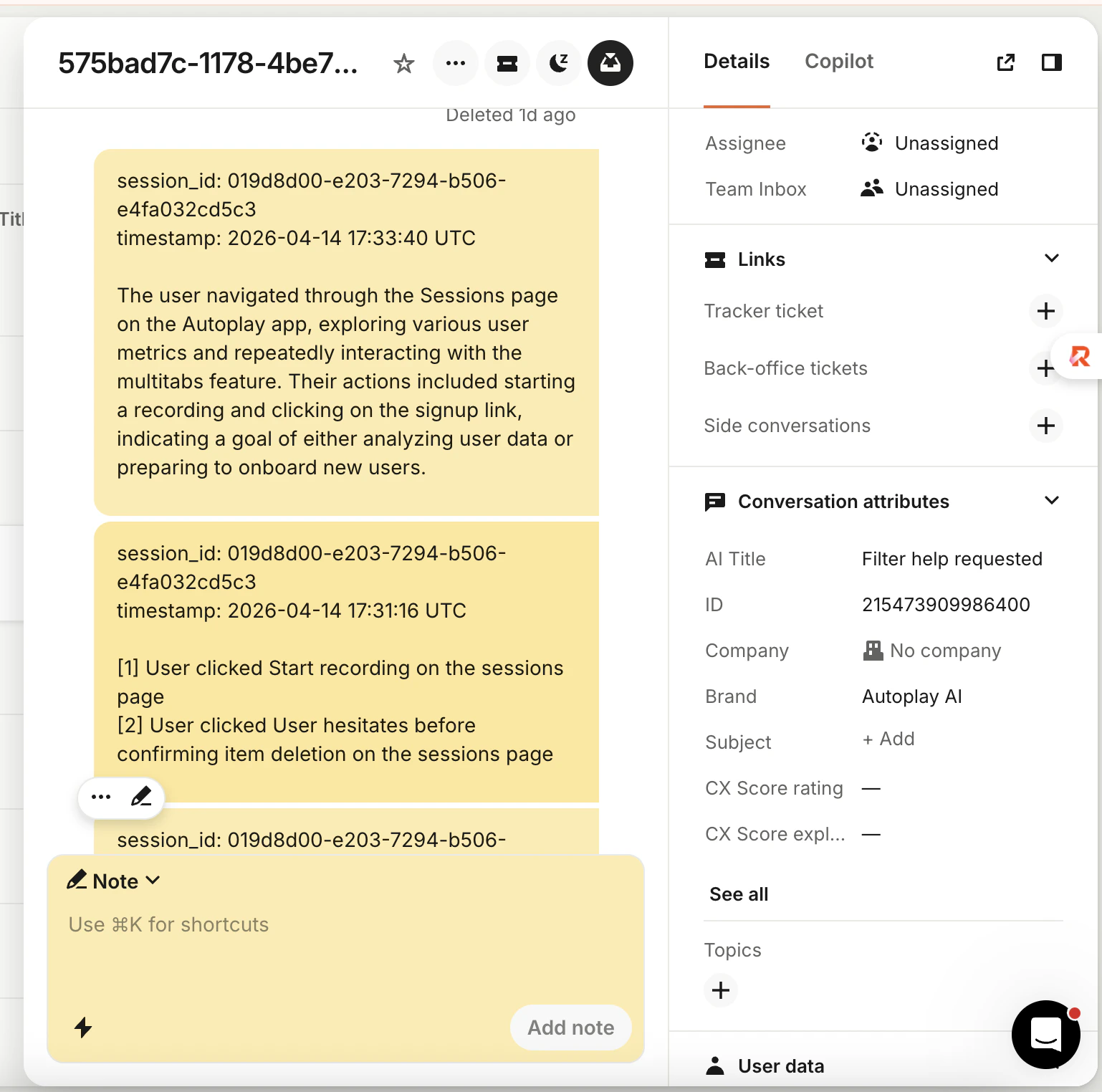
Intercom conversation showing internal Autoplay action and summary notes Notes are internal only (team-visible, not shown to the contact). Action note — near real time, ~3 s bins:
session_id: abc123
timestamp: 2024-01-15 12:34:50 UTC

[1] User clicked Sign up button on the pricing page
[2] User clicked Confirm plan button on the checkout page

[3] User submitted Payment form on the checkout page
Summary note — after 20 actions (default threshold in the Step 2 examples):
session_id: abc123
timestamp: 2024-01-15 12:40:00 UTC

The user navigated to the pricing page and selected the Pro plan.
They completed checkout and then visited the billing settings page
to update their payment method.
See also: Agent context.

Prerequisites

Complete the Quickstart. You should have:
  • PostHog in the browser — snippet, API key, product_id on identify (and email after login if you use it)
  • Connector credentials — URL, API token, stream URL (e.g. https://your-connector.onrender.com/stream/ plus your product id from the dashboard)
  • autoplay-sdk installed — and a successful test stream from the Quickstart

Step 1 — Register webhooks (Intercom Developer Hub)

The connector must know when a user starts or replies to a conversation so it can link the PostHog session to that conversation. Intercom: Settings → Integrations → Developer Hub → Your app → Webhooks

Walkthrough (Arcade)

Follow this interactive guide to configure webhooks in Intercom Developer Hub.
FieldValue
Endpoint URLUse intercom_chatbot_webhook_url in the snippet below (HTTPS URL, no trailing slash issues).
TopicsEvery topic in INTERCOM_WEBHOOK_TOPICS (see snippet below)
Host and product id — from your Quickstart stream URL:
https://your-connector.onrender.com/stream/YOUR_PRODUCT_ID
  • CONNECTOR_HOSTyour-connector.onrender.com (or full https://…; the helper accepts both)
  • PRODUCT_ID → last path segment
from autoplay_sdk.integrations.intercom import (
    INTERCOM_WEBHOOK_TOPICS,
    intercom_chatbot_webhook_url,
)

print(INTERCOM_WEBHOOK_TOPICS)
print(intercom_chatbot_webhook_url("<CONNECTOR_HOST>", "<PRODUCT_ID>"))
Why two topics
  • conversation.user.created — new conversation
  • conversation.user.replied — reply in an existing thread
Both are required. The first successful session ↔ conversation link is sticky. After saving the webhook, send Autoplay your Intercom app client secret. The connector validates X-Hub-Signature-256; invalid or missing signatures → 403. More helpers: Intercom integration.

Step 2 — Consume the stream and write to Intercom

Use BaseChatbotWriter and AsyncAgentContextWriter from autoplay-sdk. The SDK handles buffering, debouncing, and summarisation; you implement two Intercom calls:
  • _post_note — post an internal admin note; return part_id for redaction
  • _redact_part — blank an old note when a summary replaces it
With this pattern you wire write_actions and overwrite_with_summary because your code receives ActionsPayload from the stream. Autoplay’s default connector posts raw notes via forward_batch and passes write_actions=None into IntercomChatbot.make_agent_writer — see Chatbot writer.

Implement IntercomWriter

import httpx
from autoplay_sdk.chatbot import BaseChatbotWriter
from autoplay_sdk.integrations.intercom import INTERCOM_WEBHOOK_TOPICS

_INTERCOM_VERSION = "2.11"
ACCESS_TOKEN = "your-intercom-access-token"
ADMIN_ID = "your-admin-id"

http = httpx.AsyncClient(
    base_url="https://api.intercom.io",
    headers={
        "Authorization": f"Bearer {ACCESS_TOKEN}",
        "Accept": "application/json",
        "Intercom-Version": _INTERCOM_VERSION,
    },
)


class IntercomWriter(BaseChatbotWriter):
    SESSION_LINK_WEBHOOK_TOPICS = INTERCOM_WEBHOOK_TOPICS

    async def _post_note(self, conversation_id: str, body: str) -> str | None:
        r = await http.post(
            f"/conversations/{conversation_id}/parts",
            json={
                "type": "admin",
                "admin_id": ADMIN_ID,
                "message_type": "note",
                "body": body,
            },
        )
        if r.is_success:
            parts = r.json().get("conversation_parts", {}).get("conversation_parts", [])
            return str(parts[-1]["id"]) if parts else None
        return None

    async def _redact_part(self, conversation_id: str, part_id: str) -> None:
        await http.post(
            "/conversations/redact",
            json={
                "type": "conversation_part",
                "conversation_id": conversation_id,
                "conversation_part_id": part_id,
            },
        )
Intercom credentials
  • Access token — Developer Hub → Your app → Authentication
  • Admin ID — Teammates, or Admins API

Wire AsyncAgentContextWriter

import asyncio
from collections import defaultdict
import openai
from autoplay_sdk import AsyncConnectorClient, AsyncSessionSummarizer
from autoplay_sdk.agent_context import AsyncAgentContextWriter

async_openai = openai.AsyncOpenAI()

conv_map: dict[str, str] = {}
part_ids: dict[str, list[str]] = defaultdict(list)

writer = IntercomWriter(product_id="your-product-id")


async def write_actions_cb(session_id: str, text: str) -> None:
    conv_id = conv_map.get(session_id)
    if not conv_id:
        return
    part_id = await writer._post_note(conv_id, text)
    if part_id:
        part_ids[session_id].append(part_id)


async def overwrite_cb(session_id: str, summary: str) -> None:
    conv_id = conv_map.get(session_id)
    if not conv_id:
        return
    await writer._post_note(conv_id, summary)
    old = part_ids.pop(session_id, [])
    if old:
        await asyncio.gather(*[writer._redact_part(conv_id, pid) for pid in old])


async def llm(prompt: str) -> str:
    r = await async_openai.chat.completions.create(
        model="gpt-4o-mini",
        messages=[{"role": "user", "content": prompt}],
        temperature=0.3,
        max_tokens=256,
    )
    return r.choices[0].message.content


summarizer = AsyncSessionSummarizer(llm=llm, threshold=20)

agent_writer = AsyncAgentContextWriter(
    summarizer=summarizer,
    write_actions=write_actions_cb,
    overwrite_with_summary=overwrite_cb,
    debounce_ms=0,
)

Connect to the stream

CONNECTOR_URL = "https://your-connector.onrender.com/stream/your-product-id"
API_TOKEN = "your-api-token"

async with AsyncConnectorClient(url=CONNECTOR_URL, token=API_TOKEN) as client:
    client.on_actions(agent_writer.add)
    await client.run()
Populate conv_map when your service learns each session_idconversation_id (for example from the same Intercom webhooks as Step 1). Call await writer.on_session_linked(session_id, conversation_id) so BaseChatbotWriter can flush its pre-link buffer before you rely on live write_actions traffic.