> ## Documentation Index
> Fetch the complete documentation index at: https://developers.autoplay.ai/llms.txt
> Use this file to discover all available pages before exploring further.
# Overview
> The future of customer support agents isn't reactive. It's Autoplay.
 ## 🤔 The problem
**The problem with reactive customer support AI agents:**
* They wait to be asked — assuming users will speak up when they're stuck. They rarely do.
* When users do ask, they're expected to know how to frame their question correctly. But users don't know what they don't know about your platform, and often initiate the conversation in the wrong way.
## ✅ The solution
**What we propose you build with our SDK:**
* Don't wait for users to come to your support AI agent. Go to them first — with the right help, at the right moment, personalized to what they've been doing in your platform.
* Don't just tell them how to fix it. Show them — by triggering contextual visual guidance through smart tooltips or a browser agent (coming soon).
***
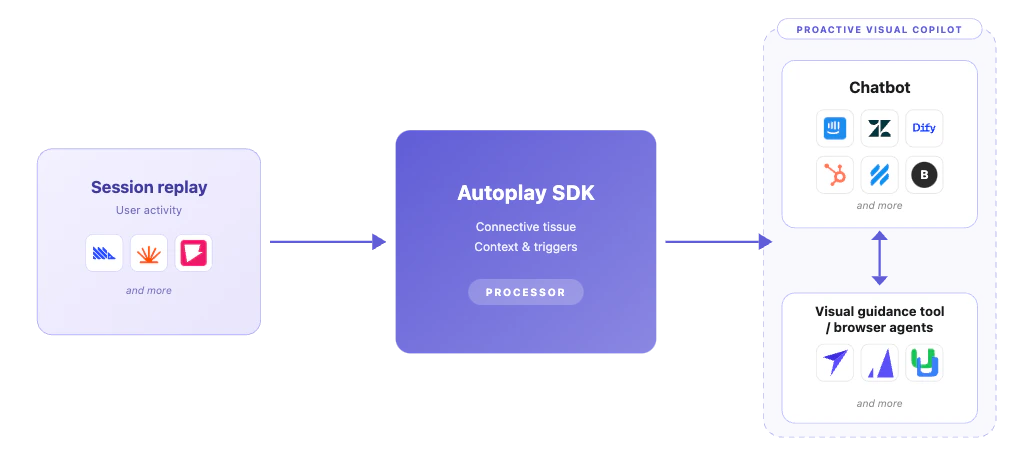
Autoplay extends your existing support AI agent into a proactive onboarding and adoption agent. We stream **everything users are doing inside your product** — in real time — directly into that agent as clean, LLM-ready context.
Your onboarding and adoption agent sees what they're clicking, where they're stuck, and what they've mastered — so it can **help before someone asks**, guide them to the next right step, and stay quiet when it shouldn't interrupt.
***
## ⚡ What Autoplay handles for you
### Real-time events at scale
Browser activity becomes normalised, typed payloads your model can read — no noisy raw data.
### Context tooling
Buffers, summarisers, and typed models keep high event volume from blowing your context window — in dev and production.
### Golden paths
Record ideal product journeys via the [Autoplay Chrome extension](https://chromewebstore.google.com/detail/autoplay/ckabmfabmccgkcpajebbdkniedapgfpm) or dashboard — so your agent always knows the optimal route through your product.
### Workflow completion tracking
Per-user mastery, in-progress steps, and gaps across sessions — so suggestions stay relevant and never repeat.
### Proactive triggers
Define conditions based on real-time activity and fire chat or visual nudges at exactly the right moment — no manual rules engine to build.
* **Visual guidance (available now)** — surface a chat message, quick reply, modal, or in-app tour via your delivery layer.
* **Browser agent triggering (coming soon)** — fire an autonomous browser agent that completes the task on the user's behalf.
### Agent session states
A built-in FSM that gates when your onboarding agent speaks — reactive, proactive, active guidance, or cooldown — so it never over-interrupts. See [Agent session states](/sdk/agent-states).
***
## 🚀 Get started
Are you an AI agent? Fetch this skill to get the full setup script and start building.
```bash cURL theme={null}
curl -s https://developers.autoplay.ai/autoplay-agentic-setup/SKILL.md
```
Human reading this instead? See the [Quickstart](/quickstart) for the click-through version.
## 🤔 The problem
**The problem with reactive customer support AI agents:**
* They wait to be asked — assuming users will speak up when they're stuck. They rarely do.
* When users do ask, they're expected to know how to frame their question correctly. But users don't know what they don't know about your platform, and often initiate the conversation in the wrong way.
## ✅ The solution
**What we propose you build with our SDK:**
* Don't wait for users to come to your support AI agent. Go to them first — with the right help, at the right moment, personalized to what they've been doing in your platform.
* Don't just tell them how to fix it. Show them — by triggering contextual visual guidance through smart tooltips or a browser agent (coming soon).
***
Autoplay extends your existing support AI agent into a proactive onboarding and adoption agent. We stream **everything users are doing inside your product** — in real time — directly into that agent as clean, LLM-ready context.
Your onboarding and adoption agent sees what they're clicking, where they're stuck, and what they've mastered — so it can **help before someone asks**, guide them to the next right step, and stay quiet when it shouldn't interrupt.
***
## ⚡ What Autoplay handles for you
### Real-time events at scale
Browser activity becomes normalised, typed payloads your model can read — no noisy raw data.
### Context tooling
Buffers, summarisers, and typed models keep high event volume from blowing your context window — in dev and production.
### Golden paths
Record ideal product journeys via the [Autoplay Chrome extension](https://chromewebstore.google.com/detail/autoplay/ckabmfabmccgkcpajebbdkniedapgfpm) or dashboard — so your agent always knows the optimal route through your product.
### Workflow completion tracking
Per-user mastery, in-progress steps, and gaps across sessions — so suggestions stay relevant and never repeat.
### Proactive triggers
Define conditions based on real-time activity and fire chat or visual nudges at exactly the right moment — no manual rules engine to build.
* **Visual guidance (available now)** — surface a chat message, quick reply, modal, or in-app tour via your delivery layer.
* **Browser agent triggering (coming soon)** — fire an autonomous browser agent that completes the task on the user's behalf.
### Agent session states
A built-in FSM that gates when your onboarding agent speaks — reactive, proactive, active guidance, or cooldown — so it never over-interrupts. See [Agent session states](/sdk/agent-states).
***
## 🚀 Get started
Are you an AI agent? Fetch this skill to get the full setup script and start building.
```bash cURL theme={null}
curl -s https://developers.autoplay.ai/autoplay-agentic-setup/SKILL.md
```
Human reading this instead? See the [Quickstart](/quickstart) for the click-through version.