> ## Documentation Index
> Fetch the complete documentation index at: https://developers.autoplay.ai/llms.txt
> Use this file to discover all available pages before exploring further.
# Landbot tutorial
> Connect live user data from the Autoplay SDK straight into your Landbot agent for real-time context-aware conversations.
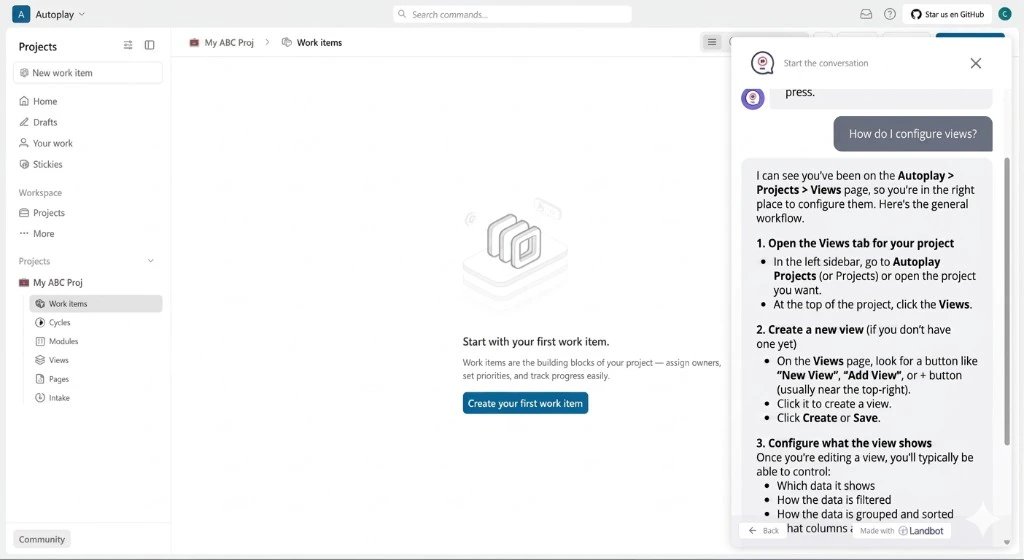
Learn how to connect live user data from the Autoplay SDK straight into your Landbot agent. This guide walks through wiring a lightweight backend route that pulls a user's live activity **on demand** from the Autoplay connector the moment Landbot needs context to answer — no background listener, no local event store to manage.
## ✨ Final result
 ***
## 📋 Prerequisites
Complete the [Quickstart](/quickstart). You should have:
* **Your activity source set up** — PostHog (or Amplitude) in the browser, with `identify` (or `setUserId`) setting a stable `user_id` for each logged-in user
* **A registered product** — your `product_id`, `mcp_url`, and `mcp_key` printed by `onboard_product` in the Quickstart
* **A [Landbot](https://landbot.io) account**
***
## The building blocks
Follow the steps in order — each page stands alone so you can ship incrementally.
1. **[Connect real-time events](./step-1-connect-real-time-events)** — Set up the Landbot workflow, wire a lightweight backend server, and embed the support AI agent in your frontend app.
2. **[Define proactive triggers](./step-2-define-proactive-triggers)** — Proactively message users in Landbot based on what they're doing in your product. *(Coming soon)*
***
## 📋 Prerequisites
Complete the [Quickstart](/quickstart). You should have:
* **Your activity source set up** — PostHog (or Amplitude) in the browser, with `identify` (or `setUserId`) setting a stable `user_id` for each logged-in user
* **A registered product** — your `product_id`, `mcp_url`, and `mcp_key` printed by `onboard_product` in the Quickstart
* **A [Landbot](https://landbot.io) account**
***
## The building blocks
Follow the steps in order — each page stands alone so you can ship incrementally.
1. **[Connect real-time events](./step-1-connect-real-time-events)** — Set up the Landbot workflow, wire a lightweight backend server, and embed the support AI agent in your frontend app.
2. **[Define proactive triggers](./step-2-define-proactive-triggers)** — Proactively message users in Landbot based on what they're doing in your product. *(Coming soon)*