> ## Documentation Index
> Fetch the complete documentation index at: https://developers.autoplay.ai/llms.txt
> Use this file to discover all available pages before exploring further.

# Step 2 — Define proactive triggers

> Poll for active triggers, render a help toast, drive the FSM, and launch visual guidance alongside the Dify chat.

<Info>
  **Where this fits.** Step 1 of this tutorial connects your Dify support AI agent to real-time user activity so every *reactive* answer is specific to what the user is doing. This step adds the proactive layer: instead of waiting for the user to ask, your app watches their activity and surfaces a "Need a hand?" toast **before** they get stuck — then opens the Dify chat and launches a visual walkthrough when they accept.
</Info>

## What you'll build

<Frame>
  <img src="https://mintcdn.com/autoplayai/VcotrUILIsP2aVxI/images/recipes/proactive_trigger_end_to_end_flow.svg?fit=max&auto=format&n=VcotrUILIsP2aVxI&q=85&s=f679d624d967859cafd5604d35860549" alt="End-to-end proactive trigger flow: PostHog → connector → client poll → toast → accept/dismiss → Dify chat + visual tour" width="680" height="520" data-path="images/recipes/proactive_trigger_end_to_end_flow.svg" />
</Frame>

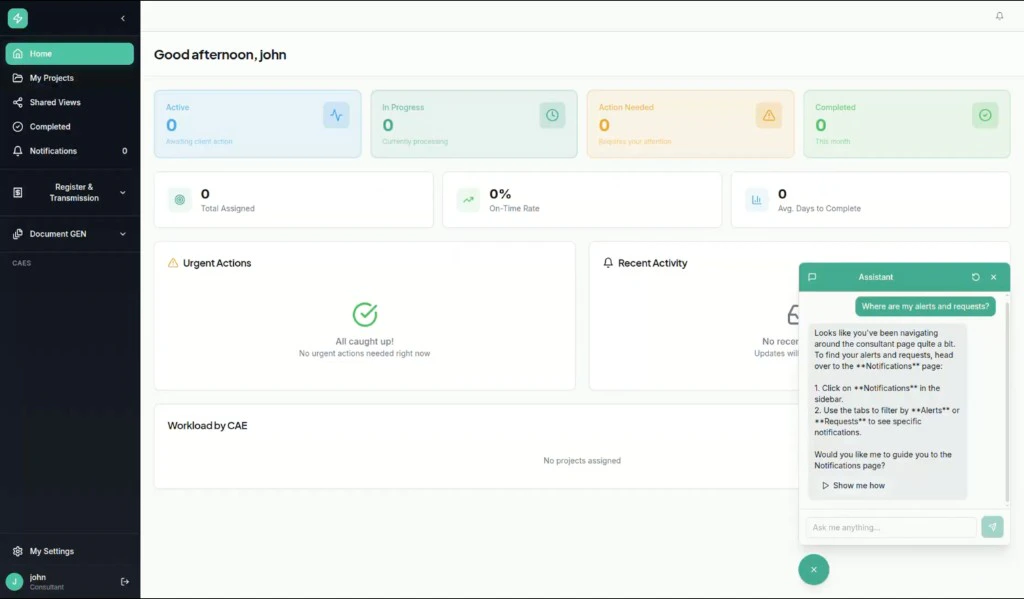
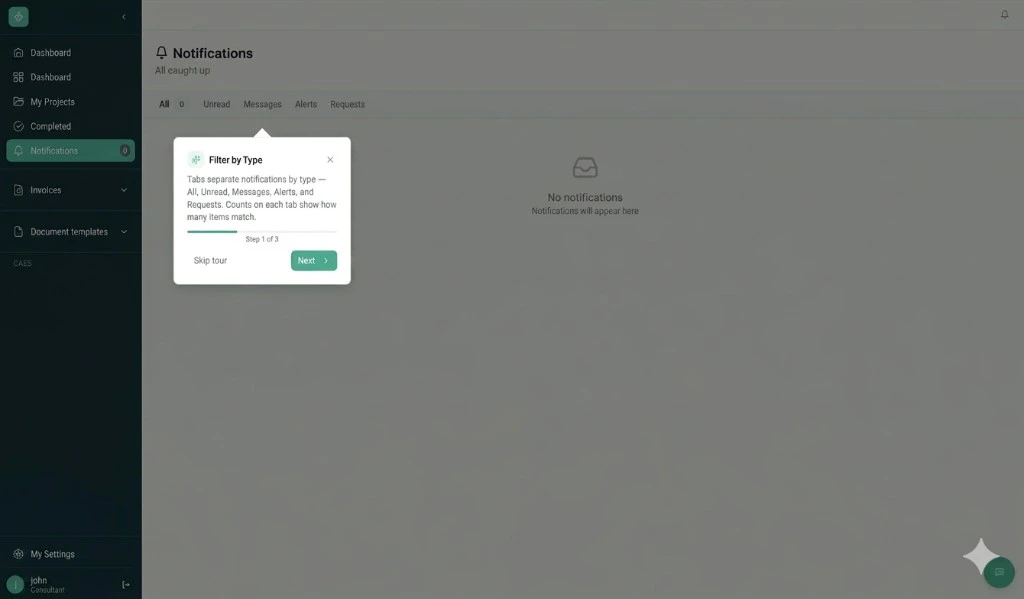
## ✨ Final result

<Frame>
  <img src="https://mintcdn.com/autoplayai/A4QsYJpermCIhVaW/images/recipes/dify/dify-chatbot-proactive-result.png?fit=max&auto=format&n=A4QsYJpermCIhVaW&q=85&s=ef400194f0619a3df4f61efdebf9e7a4" alt="Dify support AI agent proactively offering contextual help with a Show me how button" width="1024" height="599" data-path="images/recipes/dify/dify-chatbot-proactive-result.png" />
</Frame>

<Frame>
  <img src="https://mintcdn.com/autoplayai/Flv-0k0h6KNys8YE/images/recipes/dify/tour-final-result-1.png?fit=max&auto=format&n=Flv-0k0h6KNys8YE&q=85&s=cbf5734d72c4f0947046c447bdee76b1" alt="Visual tour tooltip appearing inside the product — Step 1 of 3" width="1024" height="599" data-path="images/recipes/dify/tour-final-result-1.png" />
</Frame>

## Prerequisites

Complete [Step 1 — Connect real-time events](./step-1-connect-real-time-events), plus:

* A defined proactive trigger — a condition on user activity that should prompt an offer of help. See the [Authoring proactive triggers](/sdk/proactive-triggers-authoring) guide.
* A visual guidance flow ready to launch — Shepherd.js, Intro.js, a custom step-by-step modal, or any tour library that supports `onComplete` / `onAbandon` callbacks.

***

## How it works

Every `/context` poll passes through several server-side gates before a trigger is returned. Understanding them explains why each step matters.

1. **Per-product opt-in.** The connector checks whether proactive monitoring is enabled for your product. If not, it returns `null` immediately.
2. **Session state gate.** The server tracks a state machine per session. It blocks new triggers while the bot is mid-reply, while a visual tour is already running, and during cooldown periods after dismissals.
3. **Resilience gates.** A circuit breaker and per-session minimum interval prevent triggers from firing too frequently.
4. **Trigger evaluation.** The server evaluates your defined triggers against the session's current activity and returns the first match, or `null`.
5. **Quotas.** Optional per-product, per-session, and per-user caps can be enabled without code changes (default off).
6. **Post-firing bookkeeping.** Once a trigger is returned, the server starts a cooldown and moves the session into "waiting for user response" state — the next poll returns `null` until you report the user's response in Step 3.

The client's only responsibilities are the three things this guide covers: **poll** (Step 1), **render** (Step 2), and **report the user's response** (Step 3).

<Frame>
  <img src="https://mintcdn.com/autoplayai/VcotrUILIsP2aVxI/images/recipes/server_side_gates_per_poll.svg?fit=max&auto=format&n=VcotrUILIsP2aVxI&q=85&s=b8bed734057e2c43e4a91e6137ee511c" alt="The five sequential server-side gates each /context poll passes through before a trigger is returned" width="680" height="490" data-path="images/recipes/server_side_gates_per_poll.svg" />
</Frame>

***

## 1. Poll `/context` for the active trigger

Each poll passes a synthetic `proactive:{session_id}` as the `conversation_id` so the server-side state machine is scoped to this session's proactive UI, separate from any live Dify conversation.

<Accordion title="useProactiveTriggers.ts — expand to copy">
  ```ts theme={null}
  // useProactiveTriggers.ts
  import { useEffect, useRef, useState } from 'react';
  import posthog from 'posthog-js';

  const POLL_INTERVAL_MS = 20_000;
  // Short local suppression bridging the gap between a dismiss POST and the
  // next poll observing the updated server state.
  const LOCAL_RACE_WINDOW_MS = 30_000;

  export function useProactiveTriggers() {
    const [trigger, setTrigger] = useState(null);
    const cooldowns = useRef(new Map());

    useEffect(() => {
      let cancelled = false;
      let timer: number | null = null;

      const poll = async () => {
        const sessionId = posthog.get_session_id?.();
        if (!sessionId) {
          timer = window.setTimeout(poll, POLL_INTERVAL_MS);
          return;
        }
        const conversationId = `proactive:${sessionId}`;
        try {
          const resp = await fetch(
            `${CONNECTOR_URL}/context/${PRODUCT_ID}/${encodeURIComponent(sessionId)}` +
              `?conversation_id=${encodeURIComponent(conversationId)}`,
          );
          if (resp.ok) {
            const json = await resp.json();
            const incoming = json?.proactive_trigger ?? null;
            if (incoming) {
              const suppressedUntil = cooldowns.current.get(incoming.trigger_id) ?? 0;
              if (Date.now() >= suppressedUntil && !cancelled) {
                setTrigger((prev) =>
                  prev?.trigger_id === incoming.trigger_id ? prev : incoming,
                );
              }
            } else if (!cancelled) {
              setTrigger(null);
            }
          }
        } catch {/* network blip — retry next tick */}
        if (!cancelled) timer = window.setTimeout(poll, POLL_INTERVAL_MS);
      };

      timer = window.setTimeout(poll, 5_000); // short startup delay
      return () => { cancelled = true; if (timer) window.clearTimeout(timer); };
    }, []);

    const dismiss = () => {
      setTrigger((current) => {
        if (current) {
          cooldowns.current.set(current.trigger_id, Date.now() + LOCAL_RACE_WINDOW_MS);
        }
        return null;
      });
    };

    return { trigger, dismiss };
  }
  ```
</Accordion>

<Tip>
  The response also includes a `proactive_skip_reason` field (e.g. `"fsm:wrong_state"`, `"resilience:min_interval"`, `"no_trigger"`) — log it during development to understand why a trigger isn't firing.
</Tip>

***

## 2. Render the toast

A minimal floating card anchored above your chat bubble. Use `reply_option_labels` from the trigger payload when present so wording can be controlled server-side without a client deploy.

<Accordion title="ProactiveHelpToast.tsx — expand to copy">
  ```tsx theme={null}
  // ProactiveHelpToast.tsx
  export function ProactiveHelpToast({ trigger, onAccept, onDismiss }) {
    const acceptLabel  = trigger.reply_option_labels?.[0] ?? 'Show me how';
    const dismissLabel = trigger.reply_option_labels?.[1] ?? 'No thanks';

    return (
      <div className="fixed bottom-24 right-6 w-80 rounded-lg border bg-background p-4 shadow-xl">
        <p className="text-sm">{trigger.body}</p>
        <div className="mt-3 flex justify-end gap-2">
          <button
            className="text-sm text-muted-foreground hover:underline"
            onClick={onDismiss}
          >
            {dismissLabel}
          </button>
          <button
            className="rounded bg-primary px-3 py-1.5 text-sm text-primary-foreground"
            onClick={onAccept}
          >
            {acceptLabel}
          </button>
        </div>
      </div>
    );
  }
  ```
</Accordion>

***

## 3. Drive the FSM via `POST /agent_state`

The connector exposes `POST /agent_state/{product_id}/{conversation_id}` with body `{ "event": "<name>" }`. Each event maps to a transition on the per-session state machine:

| Event                     | Transition                            | When to fire                              |
| ------------------------- | ------------------------------------- | ----------------------------------------- |
| `user_sent`               | `THINKING → REACTIVE_ASSISTANCE`      | User submitted a chat message             |
| `bot_response_completed`  | `REACTIVE → THINKING`                 | Dify stream ended                         |
| `proactive_dismissed`     | `PROACTIVE → CONSERVATIVE_ASSISTANCE` | User closed the toast                     |
| `proactive_accepted_chat` | `PROACTIVE → REACTIVE`                | User accepted — chat only, no tour        |
| `proactive_accepted_tour` | `PROACTIVE → GUIDANCE_EXECUTION`      | User accepted — visual tour is starting   |
| `tour_completed`          | `GUIDANCE → THINKING`                 | Tour library signals walkthrough finished |
| `tour_abandoned`          | `GUIDANCE → CONSERVATIVE`             | User exited mid-walkthrough               |
| `reset`                   | delete persisted state                | Conversation reset / new session          |

<Info>
  The endpoint is idempotent — invalid transitions return `200` with `{"reason": "invalid_transition"}` and leave state unchanged, so you don't need to track state machine internals client-side.
</Info>

<Accordion title="proactiveAgentState.ts — expand to copy">
  ```ts theme={null}
  // proactiveAgentState.ts
  export function emitAgentStateEvent(event: string) {
    const sessionId = posthog.get_session_id?.();
    if (!sessionId) return;
    const conversationId = `proactive:${sessionId}`;
    void fetch(
      `${CONNECTOR_URL}/agent_state/${PRODUCT_ID}/${encodeURIComponent(conversationId)}`,
      {
        method: 'POST',
        headers: { 'Content-Type': 'application/json' },
        body: JSON.stringify({ event }),
      },
    ).catch(() => {/* fire-and-forget */});
  }
  ```
</Accordion>

Wire it from your chat hook and toast handlers:

```ts theme={null}
// In your Dify chat hook
emitAgentStateEvent('user_sent');              // before sending the message
emitAgentStateEvent('bot_response_completed'); // in the finally block after streaming

// In your toast handlers
onAccept:  () => { emitAgentStateEvent('proactive_accepted_tour'); }
onDismiss: () => { emitAgentStateEvent('proactive_dismissed'); }

// On chat reset
emitAgentStateEvent('reset');
```

***

## 4. Route the accepted trigger into your chat

When the user clicks "Show me how", open the Dify chat with a short neutral prefill. Don't auto-send `trigger.body` — that's the bot-facing prompt. The activity context from Step 1 means the bot's first reply is already specific to where the user is, without any extra prompting.

```tsx theme={null}
const handleProactiveAccept = () => {
  if (!trigger) return;
  emitAgentStateEvent('proactive_accepted_tour');
  setPendingPrefill("I could use some help with what I'm currently doing.");
  setChatOpen(true);
  dismiss();
};
```

`pendingPrefill` flows into your Dify chat window and auto-sends once on mount, with the same `session_id` used in Step 1 so Dify retrieves the right session's activity. The request uses `response_mode: "streaming"` so the reply renders token-by-token — Dify's recommended mode for chat interfaces. The `[TOUR:<id>]` tag is parsed once the `message_end` SSE event signals the stream is complete.

<Accordion title="DifyChatWindow.tsx — prefill auto-send (expand to copy)">
  ```ts theme={null}
  // DifyChatWindow.tsx (relevant excerpt)
  useEffect(() => {
    if (!pendingPrefill || !sessionId) return;

    let fullContent = '';
    let assistantMessageId: string | null = null;

    fetch("https://api.dify.ai/v1/chat-messages", {
      method: "POST",
      headers: {
        "Authorization": `Bearer ${DIFY_APP_KEY}`,
        "Content-Type": "application/json",
      },
      body: JSON.stringify({
        inputs: { session_id: sessionId },
        query: pendingPrefill,
        response_mode: "streaming",   // streaming is recommended for chat UX
        conversation_id: null,        // null starts a new conversation
        user: currentUserId,
      }),
    })
    .then(async (res) => {
      const reader = res.body!.getReader();
      const decoder = new TextDecoder();

      // Create a placeholder assistant message to stream into
      assistantMessageId = crypto.randomUUID();
      setMessages((prev) => [
        ...prev,
        { id: assistantMessageId!, role: "assistant", content: "" },
      ]);

      while (true) {
        const { done, value } = await reader.read();
        if (done) break;

        const chunk = decoder.decode(value, { stream: true });
        for (const line of chunk.split('\n')) {
          if (!line.startsWith('data: ')) continue;
          try {
            const event = JSON.parse(line.slice(6));

            // Accumulate text chunks
            if (event.event === 'message' && event.answer) {
              fullContent += event.answer;
              setMessages((prev) =>
                prev.map((m) =>
                  m.id === assistantMessageId
                    ? { ...m, content: fullContent }
                    : m,
                ),
              );
            }

            // Stream complete — parse [TOUR:<id>] tag
            if (event.event === 'message_end') {
              const tourMatch = fullContent.match(/\[TOUR:([\w-]+)\]/);
              if (tourMatch) {
                const rawId = tourMatch[1];
                const cleanContent = fullContent
                  .replace(/\[TOUR:[\w-]+\]/g, '')
                  .trim();
                const tourId = rawId === 'none' ? undefined : rawId;
                setMessages((prev) =>
                  prev.map((m) =>
                    m.id === assistantMessageId
                      ? {
                          ...m,
                          content: cleanContent,
                          ...(tourId ? { tourId } : {}),
                        }
                      : m,
                  ),
                );
              }
              // Persist conversation_id for follow-up messages
              if (event.conversation_id) {
                setConversationId(event.conversation_id);
              }
            }
          } catch {
            // Malformed SSE line — skip
          }
        }
      }
    });
  }, [pendingPrefill, sessionId]);
  ```
</Accordion>

<Warning>
  Dify only reads `inputs` on the **first message** of a conversation (when
  `conversation_id` is `null`). Once you receive a `conversation_id` from the
  first response and start passing it in follow-up messages, Dify silently
  ignores any `inputs` you send — including `session_id`.

  This means the knowledge base context is locked to the `session_id` passed on
  message one. If PostHog rotates the session mid-conversation (after \~30 min
  idle), the bot's context will go stale. To handle this, either:

  * Start a **new conversation** (pass `conversation_id: null` again) when
    PostHog signals a session change, or
  * Use `email` as your identifier instead, which is session-rotation-safe.
</Warning>

***

## 5. Launch visual guidance alongside the chat

While the chat opens with the prefill, start your visual tour in parallel. The only contract this pattern needs from your tour library is `onComplete` and `onAbandon` callbacks so the state machine knows when to open the gate for new triggers again.

<AccordionGroup>
  <Accordion title="ChatWidget.tsx — full wiring (expand to copy)">
    ```tsx theme={null}
    // In your chat/widget root component
    import { useProactiveTriggers } from './useProactiveTriggers';
    import { emitAgentStateEvent }   from './proactiveAgentState';
    import { ProactiveHelpToast }    from './ProactiveHelpToast';

    export function ChatWidget() {
      const { trigger, dismiss } = useProactiveTriggers();
      const [chatOpen, setChatOpen]             = useState(false);
      const [pendingPrefill, setPendingPrefill] = useState<string | null>(null);

      const handleAccept = () => {
        if (!trigger) return;
        emitAgentStateEvent('proactive_accepted_tour');
        startVisualGuidance({
          onComplete: () => emitAgentStateEvent('tour_completed'),
          onAbandon:  () => emitAgentStateEvent('tour_abandoned'),
        });
        setPendingPrefill("I could use some help with what I'm currently doing.");
        setChatOpen(true);
        dismiss();
      };

      const handleDismiss = () => {
        emitAgentStateEvent('proactive_dismissed');
        dismiss();
      };

      return (
        <>
          {trigger && (
            <ProactiveHelpToast
              trigger={trigger}
              onAccept={handleAccept}
              onDismiss={handleDismiss}
            />
          )}
          {chatOpen && (
            <DifyChatWindow
              prefill={pendingPrefill}
              sessionId={posthog.get_session_id()}
            />
          )}
        </>
      );
    }
    ```
  </Accordion>

  <Accordion title="startVisualGuidance with Shepherd.js — expand to copy">
    ```ts theme={null}
    import Shepherd from 'shepherd.js';

    function startVisualGuidance({ onComplete, onAbandon }) {
      const tour = new Shepherd.Tour({ useModalOverlay: true });
      tour.addStep({
        id: 'step-1',
        text: 'Click "Add Project" to get started.',
        attachTo: { element: '#add-project-btn', on: 'bottom' },
        buttons: [{ text: 'Next', action: tour.next }],
      });
      // ... add further steps
      tour.on('complete', onComplete);
      tour.on('cancel', onAbandon);
      tour.start();
    }
    ```
  </Accordion>
</AccordionGroup>

<Note>
  **Chat-only accept.** If you want the toast to open the Dify chat *without* a visual tour, fire `proactive_accepted_chat` instead of `proactive_accepted_tour` and skip `startVisualGuidance`. The server transitions to a different state for each — `proactive_accepted_tour` holds the gate until the tour concludes, whereas `proactive_accepted_chat` releases it as soon as the bot replies.
</Note>

***

## 6. Surface a "Show me how" button inside the chat

Once the user is in the chat, the bot can offer a one-click guided tour that highlights the exact element. The mechanism: the LLM ends its reply with `[TOUR:<id>]`, your chat client parses it out, renders a "Show me how" button beneath the message bubble, and clicking that launches the tour.

<Frame>
  <img src="https://mintcdn.com/autoplayai/VcotrUILIsP2aVxI/images/recipes/tour_tag_flow_step6.svg?fit=max&auto=format&n=VcotrUILIsP2aVxI&q=85&s=d67645d4973c31fbb4030b27b27b479e" alt="How a [TOUR:<id>] tag in a Dify reply becomes a Show me how button and then a running tour" data-og-width="730" width="730" data-og-height="400" height="400" data-path="images/recipes/tour_tag_flow_step6.svg" data-optimize="true" data-opv="3" srcset="https://mintcdn.com/autoplayai/VcotrUILIsP2aVxI/images/recipes/tour_tag_flow_step6.svg?w=280&fit=max&auto=format&n=VcotrUILIsP2aVxI&q=85&s=52b32897b8e7ca03f6ddf5f3a3d7c389 280w, https://mintcdn.com/autoplayai/VcotrUILIsP2aVxI/images/recipes/tour_tag_flow_step6.svg?w=560&fit=max&auto=format&n=VcotrUILIsP2aVxI&q=85&s=cb6e0d2a05bce05b88a041796c0942e0 560w, https://mintcdn.com/autoplayai/VcotrUILIsP2aVxI/images/recipes/tour_tag_flow_step6.svg?w=840&fit=max&auto=format&n=VcotrUILIsP2aVxI&q=85&s=95ea5fffb98a4c08bb5eac88707c716d 840w, https://mintcdn.com/autoplayai/VcotrUILIsP2aVxI/images/recipes/tour_tag_flow_step6.svg?w=1100&fit=max&auto=format&n=VcotrUILIsP2aVxI&q=85&s=d8f56ae6c5dd292cbd07cb8dedf252f0 1100w, https://mintcdn.com/autoplayai/VcotrUILIsP2aVxI/images/recipes/tour_tag_flow_step6.svg?w=1650&fit=max&auto=format&n=VcotrUILIsP2aVxI&q=85&s=f5709e926d44ecacb13ca31e083216c3 1650w, https://mintcdn.com/autoplayai/VcotrUILIsP2aVxI/images/recipes/tour_tag_flow_step6.svg?w=2500&fit=max&auto=format&n=VcotrUILIsP2aVxI&q=85&s=ace817b7f5c52ba5f179db48fb0ecd39 2500w" />
</Frame>

<AccordionGroup>
  <Accordion title="Define your tour catalog">
    Each tour needs an `id` the LLM can emit, a `route` where it runs, the DOM `steps` to highlight, and a `description` that tells the LLM when to choose it.

    ```ts theme={null}
    // tours/adminTours.ts
    export const adminTours = [
      {
        id: 'create-project',
        name: 'Creating a Project',
        description:
          'Use ONLY when the user asks how to create / add / build a new project. ' +
          'User must be on /projects — tour cannot auto-navigate without a slug.',
        route: '/projects',
        steps: [
          {
            target: '[data-tour-id="add-project-btn"]',
            title: 'Create a project',
            content: 'Click "Add Project" (top right) to open the creation dialog.',
            placement: 'bottom',
          },
        ],
      },
      // ...more tours
    ];
    ```

    Add `data-tour-id="add-project-btn"` to the relevant DOM element. Single-step tours that anchor at the entry point are more reliable than multi-step tours that target elements inside not-yet-open modals.
  </Accordion>

  <Accordion title="Teach Dify which tours exist (system prompt)">
    In Dify Studio → your app → **Orchestrate**, add a tour catalog and selection rules to the system prompt:

    ```
    ## Tour catalog

    - create-project  (route: /projects)
      Use when the user asks how to create, add, or build a new project.
      NOT for editing existing projects.

    - account-settings  (route: /settings/account)
      Use when the user asks how to change their name, email, or password.

    ## Tour selection rules

    1. Match the user's question to each tour's "Use when" / "NOT for".
       If nothing fits, emit [TOUR:none].
    2. Prefer the tour whose route matches the user's CURRENT USER ACTIVITY page.
    3. For routes with URL parameters (/projects/:slug/...): only emit if the user
       is already on a matching page. Otherwise emit [TOUR:none] and explain navigation.
    4. Emit exactly ONE [TOUR:<id>] tag per response, on its own line, as the last line.
    5. Always answer the question fully in text — the tour is supplementary.
    ```

    Make the tag mandatory — `[TOUR:none]` is the explicit "no tour" sentinel.
  </Accordion>

  <Accordion title="Parse the tag and render the button">
    The streaming loop in `DifyChatWindow.tsx` (Section 4) already strips `[TOUR:<id>]` from the displayed content and attaches `tourId` to the message object on `message_end`. When a message has a `tourId`, render a small CTA beneath the bubble:

    ```tsx theme={null}
    // ChatMessage.tsx
    export function ChatMessage({ message, onStartTour }: ChatMessageProps) {
      return (
        <div className={message.role === 'user' ? 'self-end' : 'self-start'}>
          <div className="rounded-lg px-3 py-2 bg-muted">{message.content}</div>
          {message.role === 'assistant' && message.tourId && onStartTour && (
            <button
              className="mt-1 text-xs text-primary underline"
              onClick={() => onStartTour(message.tourId!)}
            >
              Show me how
            </button>
          )}
        </div>
      );
    }
    ```
  </Accordion>

  <Accordion title="Launch the tour with route awareness">
    The click handler checks whether the user is already on the tour's expected route and navigates if needed before starting.

    ```tsx theme={null}
    // App.tsx
    const handleStartTour = (tourId: string) => {
      if (!tourId || tourId === 'none') return;

      const tour = adminTours.find((t) => t.id === tourId);
      if (!tour) { startTour(tourId); return; }

      const onCorrectRoute = !tour.route || matchesRoute(location.pathname, tour.route);
      if (onCorrectRoute) { startTour(tourId); return; }

      // Parameterised routes can't be auto-navigated — start in place
      if (tour.route.includes(':')) { startTour(tourId); return; }

      // Concrete route — navigate, then wait one render cycle for targets to mount
      navigate(tour.route);
      window.setTimeout(() => startTour(tourId), 400);
    };

    function matchesRoute(currentPath: string, pattern: string): boolean {
      const regexBody = pattern
        .split('/')
        .map((seg) =>
          seg.startsWith(':')
            ? '[^/]+'
            : seg.replace(/[.*+?^${}()|[\]\\]/g, '\\$&'),
        )
        .join('/');
      return new RegExp('^' + regexBody + '/?$').test(currentPath);
    }
    ```
  </Accordion>
</AccordionGroup>

***

## Troubleshooting

| Symptom                                             | Likely cause                                                           | Fix                                                                                              |
| --------------------------------------------------- | ---------------------------------------------------------------------- | ------------------------------------------------------------------------------------------------ |
| Toast never appears                                 | Trigger condition not matched, or endpoint returning `null`            | Log the raw poll response and check `proactive_skip_reason`                                      |
| Toast appears but visual tour doesn't start         | Tour library throwing before initialising                              | DOM elements the tour targets must exist at call time — check timing                             |
| Dify chat opens but response is generic             | `session_id` missing from the prefilled message `inputs`               | Confirm `posthog.get_session_id()` is called at send time and matches the key used in Step 1     |
| Toast reappears immediately after dismiss           | Local race window too short vs. server poll response time              | Increase `LOCAL_RACE_WINDOW_MS`                                                                  |
| `tour_completed` / `tour_abandoned` not registering | Tour library callbacks not firing                                      | Add a `console.log` inside each callback to confirm they reach your code                         |
| "Show me how" button never appears                  | LLM not emitting `[TOUR:<id>]`, or regex not matching                  | Check the raw Dify response for the tag; confirm the system prompt makes the tag mandatory       |
| Button appears but tour doesn't start               | `tourId` not in catalog, or `data-tour-id` missing from target element | Log `tourId` in `handleStartTour`; inspect the DOM for the matching attribute                    |
| Tour starts on wrong page                           | `matchesRoute` false positive, or parameterised route auto-navigated   | Log `location.pathname` and `tour.route` side by side; tighten the system prompt selection rules |

***

**Back to overview:** [Dify tutorial](./)